Skip to content

Hey Niels

  • Home
  • About me

Power BI

Everything about Power BI Desktop, Power BI reports, etc.

How can I connect to an Excel file stored on SharePoint using Power BI Desktop or Power Query?

January 7, 2026April 1, 2025 by Niels
Data flow from SharePoint Excel to Power BI

When you first get started with Power BI Desktop, it’s common to connect to an Excel file as the data source for your report. In Power BI Desktop, you simply select Excel Workbook, choose a file from your local machine or OneDrive, click Load, and start building your report. Refresh option disabled for semantic model … Read more

Categories Power BI, Power Query

How can I manually add a row to a table in Power Query?

January 5, 2026May 19, 2021 by Niels
Ticket priority table example after adding the new row

I was looking for a simple way in Power BI Desktop and Power Query to manually add a row to an existing table using Power Query M. This is not supported through the standard Power Query interface, but is possible by using the Advanced Editor. In this example, I add an extra row to the … Read more

Categories Power BI, Power Query

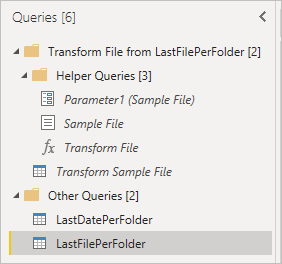
How can I successfully process the latest file over multiple folders using Power Query?

January 5, 2026July 18, 2020 by Niels

I ran into this question when I wanted to import cost analysis data from Azure into Power BI Desktop using Power Query. Azure Cost Management lets you schedule a daily export of week-to-date or month-to-date cost data and store the files in an Azure Storage account. When you enable this, the export process creates a … Read more

Categories Power BI, Power Query

Categories

  • Power BI (3)
    • Power Query (3)
  • SQL Server (1)
© 2026 heyniels.com – Site policy
Build with GeneratePress