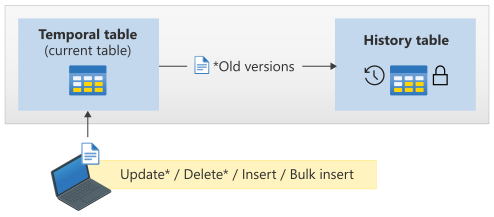
SQL Server temporal tables are a powerful feature for tracking how data evolves over time. They automatically maintain historical versions of rows, making them invaluable for:
- Auditing: Capturing changes for compliance and accountability.
- Slowly Changing Dimensions (SCD): Supporting data warehousing scenarios.
- Data Protection: Safeguarding against accidental updates or deletions.
What are temporal tables?
A system-versioned temporal table consists of two physical tables:
- Current Table – Stores the active records.
- History Table – Stores historical versions of those records.
SQL Server manages these tables automatically when system versioning is enabled. However, when you need to alter the schema (e.g., move to a new schema, add columns, or change data types), you must apply changes to both tables while maintaining versioning integrity.
Steps to alter schema of a Temporal Table
To modify the schema, the following steps are required:
- Disable system versioning on the temporal table.
- Alter the schema of the current table.
- Alter the schema of the history table.
- Re-enable system versioning, linking the current and history tables.
Recommended approach
Wrap all operations in a transaction to ensure atomicity. If any step fails, the transaction rolls back automatically, preventing partial changes.
Here’s an example:
BEGIN TRAN;

-- Disable system versioning
ALTER TABLE [current_schema].[MyTable]
SET (SYSTEM_VERSIONING = OFF);

-- Transfer current table to new schema
ALTER SCHEMA [new_schema]
TRANSFER [current_schema].[MyTable];

-- Transfer history table to new schema
ALTER SCHEMA [new_schema]
TRANSFER [current_schema].[MyTable_History];

-- Re-enable system versioning
ALTER TABLE [new_schema].[MyTable]
SET (SYSTEM_VERSIONING = ON (
    HISTORY_TABLE = [new_schema].[MyTable_History]
));

COMMIT;
Additional considerations
- Permissions: Ensure you have
ALTERandCONTROLpermissions on both schemas. - Indexes and Constraints: Validate that indexes and foreign keys remain intact after schema changes.
- Data Integrity: Confirm that the history table still correctly references the current table.
- Performance Impact: Disabling versioning temporarily may affect queries relying on historical data.
- Testing First: Test changes in a non-production environment before applying them to a production database.
- Backup: Always make sure that you have a back-up of the database before making structural changes.